Back to CEU courses

Presenter study handout

Why Visual Performance Matters: Foundations for Occupational Therapy Practice

3 contact hours · 0.3 AOTA CEUs · Module 5 · 21 slides

Presenter-side material. Each block shows the slide as the audience sees it, the talk track, and space for your own notes. Model answers appear here — do not hand this version to learners.

Module 5

5.1 — Module 5

Transition

Module 5

Module 5

Why Visual Performance Matters: Foundations for Occupational Therapy Practice
1 / 21

Say this

Transition: "Module 5."

My notes

5.2 — The Low-Vision Service Model

Title

Module 5

The Low-Vision Service Model

Usable vs. non-usable vision, and the environmental modifications that change performance today.

Why Visual Performance Matters: Foundations for Occupational Therapy Practice
2 / 21
  • Usable vs. non-usable vision, and the environmental modifications that change performance today.

Say this

Open here. "The Low-Vision Service Model." Usable vs. non-usable vision, and the environmental modifications that change performance today.

Say why this section matters for their caseload, then advance.

My notes

5.3 — Your low-vision toolkit

Poll

Poll

Your low-vision toolkit

Which low-vision strategies have you already used?

Why Visual Performance Matters: Foundations for Occupational Therapy Practice
3 / 21
  • Which low-vision strategies have you already used?
  • – Increased lighting or contrast
  • – Magnification or larger print
  • – Text-to-speech or audio support
  • – Tactile or non-visual substitution
  • – None of these yet

Say this

Ask the poll: "Which low-vision strategies have you already used?"

Options:

• Increased lighting or contrast

My notes

5.4 — Two categories of clients drive two different plans

Teaching slide

Service model

Two categories of clients drive two different plans

  • Usable vision — the client can still use residual vision functionally with the right supports.
  • Non-usable vision — vision cannot be relied on as the primary channel; other senses and strategies carry the task.
  • For vision users: increase visibility, enhance visual components, and augment with other sensory input.
  • The same environment can be modified for both groups at once — lighting and contrast changes rarely conflict.

Environment

Lighting, glare control, contrast, seating, clutter reduction

Task

Print size, spacing, slant board, reduced copy load

Non-optical tools

Reading guides, bold-line paper, typoscope, task lamp

Optical / AT

Magnification, screen enlargement, speech output — with the eye care team

Instruction

Compensatory strategy training and self-advocacy

Work up the ladder, not down it. Environment and task changes are the cheapest, fastest, and most durable supports in a school day.
Why Visual Performance Matters: Foundations for Occupational Therapy Practice
4 / 21
  • Usable vision — the client can still use residual vision functionally with the right supports.
  • Non-usable vision — vision cannot be relied on as the primary channel; other senses and strategies carry the task.
  • For vision users: increase visibility, enhance visual components, and augment with other sensory input.
  • The same environment can be modified for both groups at once — lighting and contrast changes rarely conflict.

Say this

Frame the slide: "Two categories of clients drive two different plans."

Walk each point, one sentence each:

• Usable vision — the client can still use residual vision functionally with the right supports.

My notes

5.5 — Environment first, then the page

Comparison

Increasing visibility

Environment first, then the page

Environment

  • Preferential seating closer to the front / instructional materials
  • Appropriate lighting; avoid glare; face away from windows
  • Minimize patterned backgrounds and visual clutter
  • Encourage large, bold, black-marker writing on whiteboards

The page

  • Enlarge text; use large print where possible
  • Maximize print contrast — black on white or white on black
  • Use a familiar, bold typeface; avoid decorative or superfluous fonts
  • Provide high-contrast stickers or labels for materials
Student reading at a desk with the window to the side, a gooseneck task lamp lighting the page, a matte desk mat, and a slant board

Window beside or behind

Never seat a student facing an unshaded window — silhouetting collapses page contrast.

Task light on the working side

Directed onto the page from over the non-writing shoulder to avoid hand shadow and specular glare.

Matte surface + slant board

A non-glare mat and an angled surface raise effective contrast without changing the material.

Lighting is an intervention. Seat the student so the window is beside or behind them, add a task light on the working side, and use a matte overlay or tilted surface to kill specular glare on the page or screen.
Why Visual Performance Matters: Foundations for Occupational Therapy Practice
5 / 21
  • Environment: Preferential seating closer to the front / instructional materials · Appropriate lighting; avoid glare; face away from windows · Minimize patterned backgrounds and visual clutter · Encourage large, bold, black-marker writing on whiteboards
  • The page: Enlarge text; use large print where possible · Maximize print contrast — black on white or white on black · Use a familiar, bold typeface; avoid decorative or superfluous fonts · Provide high-contrast stickers or labels for materials

Say this

Contrast the two columns: Environment versus The page.

Environment:

• Preferential seating closer to the front / instructional materials

My notes

5.6 — Lighting is a modifiable variable, not a fixed constraint

Teaching slide

Lighting and glare

Lighting is a modifiable variable, not a fixed constraint

  • Light from behind, over the shoulder, close to the reading surface — avoid shadowing.
  • Use full-spectrum lighting where possible; avoid glossy paper that creates glare.
  • Use typoscopes (line-isolation windows) and colored overlays/filters when they measurably improve performance.
  • Improper lighting causes glare, shadows, and strain that compound both low vision and visual-processing deficits.
Student reading at a desk with the window to the side, a gooseneck task lamp lighting the page, a matte desk mat, and a slant board

Window beside or behind

Never seat a student facing an unshaded window — silhouetting collapses page contrast.

Task light on the working side

Directed onto the page from over the non-writing shoulder to avoid hand shadow and specular glare.

Matte surface + slant board

A non-glare mat and an angled surface raise effective contrast without changing the material.

Lighting is an intervention. Seat the student so the window is beside or behind them, add a task light on the working side, and use a matte overlay or tilted surface to kill specular glare on the page or screen.
Why Visual Performance Matters: Foundations for Occupational Therapy Practice
6 / 21
  • Light from behind, over the shoulder, close to the reading surface — avoid shadowing.
  • Use full-spectrum lighting where possible; avoid glossy paper that creates glare.
  • Use typoscopes (line-isolation windows) and colored overlays/filters when they measurably improve performance.
  • Improper lighting causes glare, shadows, and strain that compound both low vision and visual-processing deficits.

Say this

Frame the slide: "Lighting is a modifiable variable, not a fixed constraint."

Walk each point, one sentence each:

• Light from behind, over the shoulder, close to the reading surface — avoid shadowing.

My notes

5.7 — Contrast is not intuitive — measure it

Comparison

Contrast reference

Contrast is not intuitive — measure it

Real-world contrast values

  • Exit sign: ~80% contrast
  • Newspaper print: ~71–75% contrast
  • Currency: ~55–60% contrast
  • Gray car in shade: ~32% contrast
  • Maroon chair on maroon carpet: ~5% contrast

What this means for classrooms

  • Everyday materials sit far below the contrast a low-vision student needs
  • High-contrast worksheets change access, not just comfort
  • Contrast-sensitivity tools (e.g., Lea Low Contrast Chart) quantify it
  • Pair contrast fixes with figure-ground support
80%
The quick brown fox — 5 6 8 3
Exit sign
73%
The quick brown fox — 5 6 8 3
Newspaper print
58%
The quick brown fox — 5 6 8 3
Currency
32%
The quick brown fox — 5 6 8 3
Gray car in shade
5%
The quick brown fox — 5 6 8 3
Maroon chair on maroon carpet

Quantify it for the report with a contrast-sensitivity tool (e.g., Lea Low Contrast) rather than estimating by eye.

Contrast is not intuitive — each band shows sample text at the approximate contrast of a real-world target. Everyday classroom materials often sit well below what a student with low vision needs.
Why Visual Performance Matters: Foundations for Occupational Therapy Practice
7 / 21
  • Real-world contrast values: Exit sign: ~80% contrast · Newspaper print: ~71–75% contrast · Currency: ~55–60% contrast · Gray car in shade: ~32% contrast · Maroon chair on maroon carpet: ~5% contrast
  • What this means for classrooms: Everyday materials sit far below the contrast a low-vision student needs · High-contrast worksheets change access, not just comfort · Contrast-sensitivity tools (e.g., Lea Low Contrast Chart) quantify it · Pair contrast fixes with figure-ground support

Say this

Contrast the two columns: Real-world contrast values versus What this means for classrooms.

Real-world contrast values:

• Exit sign: ~80% contrast

My notes

5.8 — What those contrast values actually look like

Visual

Contrast reference

What those contrast values actually look like

Circle the word that names the picture.

~90% contrast — Black on white — target for worksheets and labels.

Circle the word that names the picture.

~70% contrast — Typical newspaper / textbook print.

Circle the word that names the picture.

~40% contrast — Faded photocopy — many classroom handouts land here.

Circle the word that names the picture.

~10% contrast — Low-contrast worksheet; effectively inaccessible.

Circle the word that names the picture.

Reverse contrast — white on dark; often preferred with glare or photophobia.

Circle the word that names the picture.

Tinted background — trial it; keep it only if performance measurably improves.

The same sentence at descending contrast. Access fails long before the text disappears for a typically sighted adult — check the handout, not just the eye. Reverse contrast (light on dark) helps many students with glare sensitivity or media opacities.

The same worksheet line at ~90%, ~70%, ~40%, and ~10% contrast, plus reverse and tinted variants — hold a student handout next to these before assuming the print is usable.

Why Visual Performance Matters: Foundations for Occupational Therapy Practice
8 / 21
  • The same worksheet line at ~90%, ~70%, ~40%, and ~10% contrast, plus reverse and tinted variants — hold a student handout next to these before assuming the print is usable.
  • Diagram: contrast-examples

Say this

Talk over the visual: "What those contrast values actually look like."

Say the caption in your own words: The same worksheet line at ~90%, ~70%, ~40%, and ~10% contrast, plus reverse and tinted variants — hold a student handout next to these before assuming the print is usable.

My notes
5.9 — Magnification options, side by side

Visual

Assistive technology

Magnification options, side by side

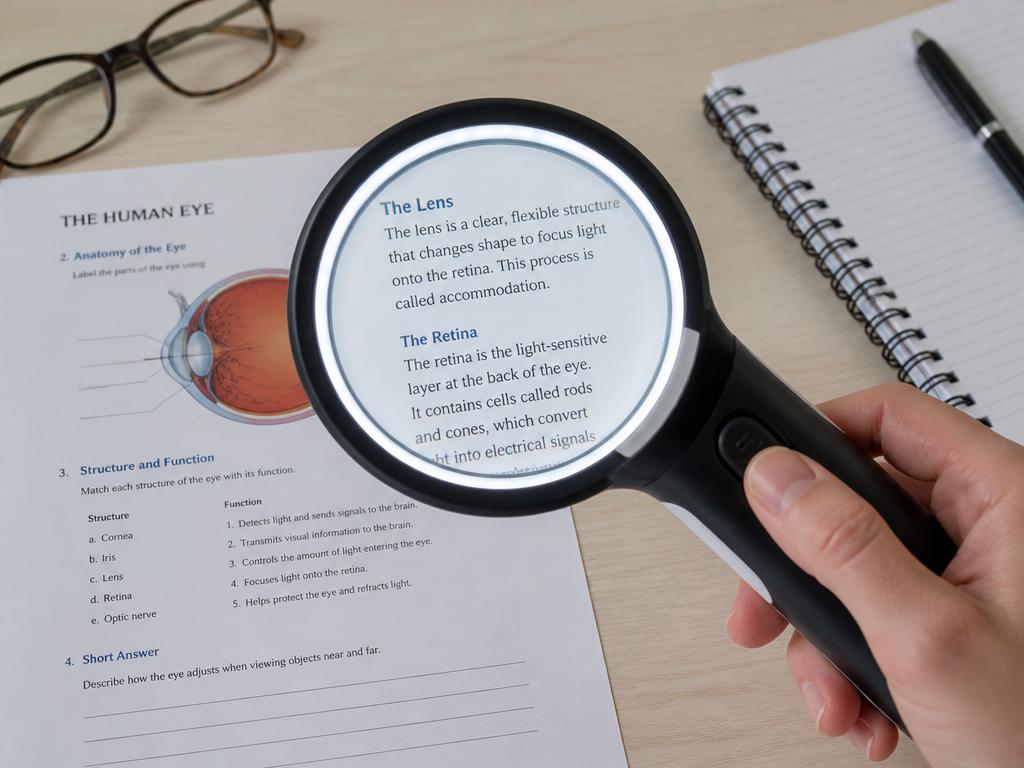
Illuminated handheld optical magnifier held above a printed worksheet, enlarging a block of text through the lens
Handheld: portable spot use; the student controls focal distance.
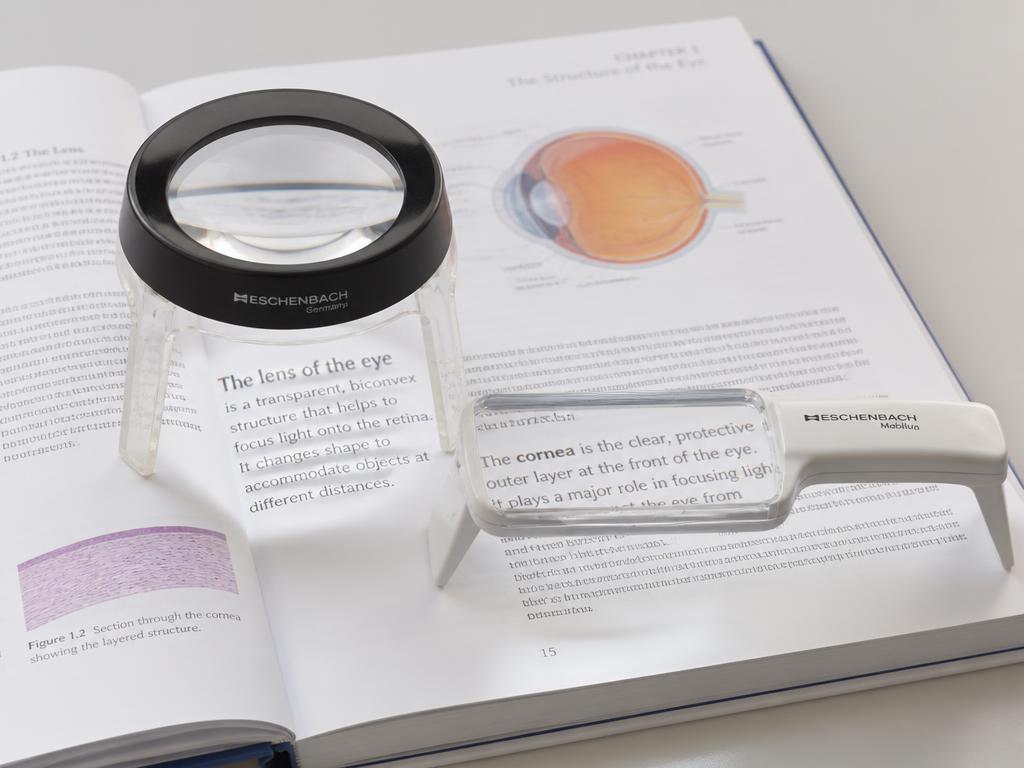
Dome stand magnifier and bar magnifier resting directly on an open book page at a fixed focal distance
Stand / bar: lens sits on the page — fixed focus, steady for sustained reading.
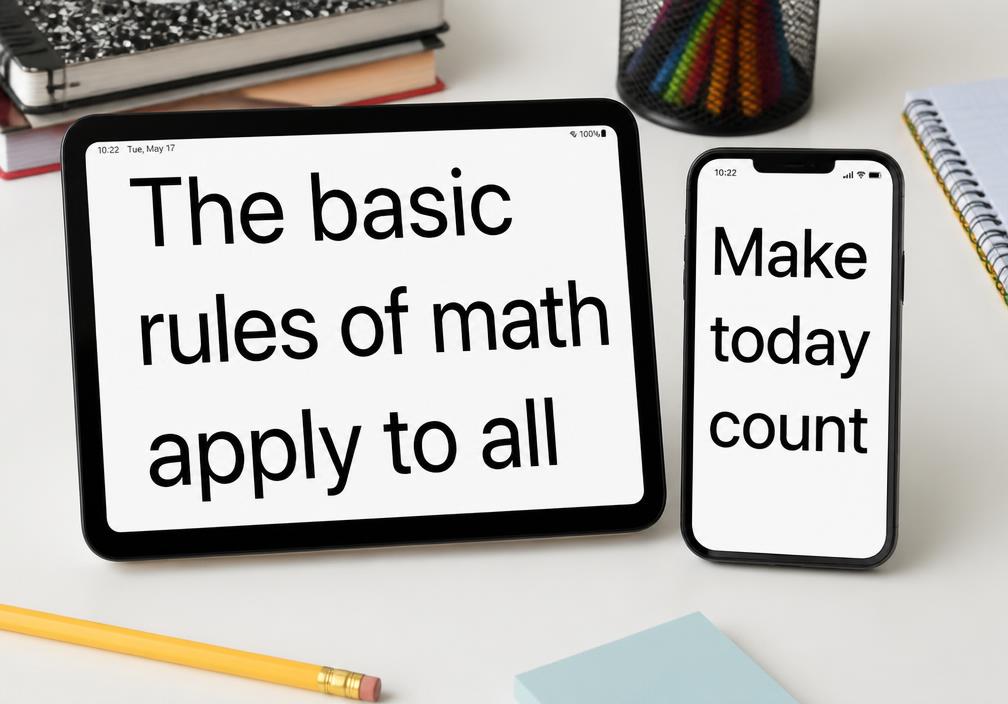
Tablet and smartphone on a desk displaying greatly enlarged high-contrast text using built-in accessibility zoom
Electronic / built-in digital: adjustable power, contrast, and speech.

Handheld magnifier

Short spot tasks: price tags, labels, a single line of text.

Portable and cheap; requires a steady hand and short focal distance.

Stand magnifier

Sustained near work for students with tremor or poor motor control.

Fixed focal distance holds the lens steady; less portable, needs desk space.

Hands-free / spectacle

Writing and bimanual tasks where both hands must stay free.

Prescribed by the eye care team; very short working distance at high power.

Telescope (mono/binocular)

Distance targets: the board, signage, a demonstration across the room.

Spot use only — narrow field, not for travel or continuous viewing.

Electronic / video magnifier (CCTV)

Long reading and writing sessions; textbooks, worksheets, science labs.

Adds adjustable magnification, reverse contrast, and speech; cost and setup.

Built-in digital magnification

Phone/tablet zoom, text enlargement, VoiceOver, screen readers.

Already in the student’s hands and free; teach it before purchasing hardware.

Match the device to the task, not to the diagnosis. Higher power means a shorter working distance and a narrower field — students usually need more than one option across the day.

Handheld, stand, spectacle/telescope, electronic (CCTV), and built-in digital magnification — each with its own working distance and field trade-off.

Why Visual Performance Matters: Foundations for Occupational Therapy Practice
9 / 21
  • Handheld, stand, spectacle/telescope, electronic (CCTV), and built-in digital magnification — each with its own working distance and field trade-off.
  • Diagram: magnification-types

Say this

Talk over the visual: "Magnification options, side by side."

Say the caption in your own words: Handheld, stand, spectacle/telescope, electronic (CCTV), and built-in digital magnification — each with its own working distance and field trade-off.

My notes

5.10 — Low vision: what OT addresses, and when OT refers

Teaching slide

Scope check

Low vision: what OT addresses, and when OT refers

  • Diagnosed acuity loss: magnify, enlarge, control working distance, seat for the task.
  • Documented contrast loss: high-contrast materials, bold-line paper, glare control.
  • Documented field loss: scanning patterns, anchoring, materials in the intact field, O&M collaboration.
  • Refer when the loss is undiagnosed, correction is unverified, or anything is new or worsening.
Finding
Diagnosed & managed → OT addresses
New / undiagnosed / changing → refer
Reduced acuity
Magnify (optical, electronic, or digital), enlarge print, increase working-distance control, reduce visual clutter, seat for viewing angle.
No comprehensive eye exam on file, correction not worn or outgrown, or a new drop in near/distance performance.
Reduced contrast sensitivity
High-contrast materials, bold line paper, dark-on-light or reverse-polarity screens, glare and lighting control, edge marking on stairs and thresholds.
Contrast difficulty never evaluated, or a functional loss that is new, worsening, or does not match the documented diagnosis.
Field loss
Teach systematic scanning, anchoring, and line-tracking; position materials and seating into the intact field; organize the workspace; travel-safety routines with the O&M specialist.
Field loss suspected but never documented, or new field complaints, bumping, or missed content on one side.
Ocular alignment, oculomotor, accommodation
Grade the visual demand of the occupation, build near-point stamina, chunk and space text, schedule visual breaks.
New eye turn, new double vision, headaches or pain with near work, or no eye care follow-up in place.

OT addresses diagnosed, medically managed limitations. A new or undiagnosed finding is a referral — the diagnosis has to come first before we treat that finding as a known visual limitation.

The standing rule: OT addresses the functional limitation only when the ocular condition is already diagnosed and medically managed. If the finding is new, undiagnosed, unclear, or changing, the appropriate OT action is referral.
Why Visual Performance Matters: Foundations for Occupational Therapy Practice
10 / 21
  • Diagnosed acuity loss: magnify, enlarge, control working distance, seat for the task.
  • Documented contrast loss: high-contrast materials, bold-line paper, glare control.
  • Documented field loss: scanning patterns, anchoring, materials in the intact field, O&M collaboration.
  • Refer when the loss is undiagnosed, correction is unverified, or anything is new or worsening.

Say this

Frame the slide: "Low vision: what OT addresses, and when OT refers."

Walk each point, one sentence each:

• Diagnosed acuity loss: magnify, enlarge, control working distance, seat for the task.

My notes

5.11 — Magnification and AT, matched to the task

Comparison

Assistive technology

Magnification and AT, matched to the task

Optical and electronic magnification

  • Handheld, stand, and hands-free magnifiers for near tasks
  • Telescopes (binocular or monocular) for distance viewing
  • Electronic magnification (desktop or portable) adds adjustable contrast and screen-reader options
  • Stronger magnifiers require shorter focal distances — fit to task, not preference alone

Everyday and digital AT

  • Built-in phone/tablet accessibility features: text enlargement, voice-over, magnifier
  • Screen magnifiers/readers (e.g., ZoomText, JAWS); text-to-speech and speech-to-text apps
  • Slant boards to reduce glare and improve writing visibility
  • Contrast tape on steps/furniture edges; tactile graphics for spatial tasks
Illuminated handheld optical magnifier held above a printed worksheet, enlarging a block of text through the lens
Handheld: portable spot use; the student controls focal distance.
Dome stand magnifier and bar magnifier resting directly on an open book page at a fixed focal distance
Stand / bar: lens sits on the page — fixed focus, steady for sustained reading.
Tablet and smartphone on a desk displaying greatly enlarged high-contrast text using built-in accessibility zoom
Electronic / built-in digital: adjustable power, contrast, and speech.

Handheld magnifier

Short spot tasks: price tags, labels, a single line of text.

Portable and cheap; requires a steady hand and short focal distance.

Stand magnifier

Sustained near work for students with tremor or poor motor control.

Fixed focal distance holds the lens steady; less portable, needs desk space.

Hands-free / spectacle

Writing and bimanual tasks where both hands must stay free.

Prescribed by the eye care team; very short working distance at high power.

Telescope (mono/binocular)

Distance targets: the board, signage, a demonstration across the room.

Spot use only — narrow field, not for travel or continuous viewing.

Electronic / video magnifier (CCTV)

Long reading and writing sessions; textbooks, worksheets, science labs.

Adds adjustable magnification, reverse contrast, and speech; cost and setup.

Built-in digital magnification

Phone/tablet zoom, text enlargement, VoiceOver, screen readers.

Already in the student’s hands and free; teach it before purchasing hardware.

Match the device to the task, not to the diagnosis. Higher power means a shorter working distance and a narrower field — students usually need more than one option across the day.
Why Visual Performance Matters: Foundations for Occupational Therapy Practice
11 / 21
  • Optical and electronic magnification: Handheld, stand, and hands-free magnifiers for near tasks · Telescopes (binocular or monocular) for distance viewing · Electronic magnification (desktop or portable) adds adjustable contrast and screen-reader options · Stronger magnifiers require shorter focal distances — fit to task, not preference alone
  • Everyday and digital AT: Built-in phone/tablet accessibility features: text enlargement, voice-over, magnifier · Screen magnifiers/readers (e.g., ZoomText, JAWS); text-to-speech and speech-to-text apps · Slant boards to reduce glare and improve writing visibility · Contrast tape on steps/furniture edges; tactile graphics for spatial tasks

Say this

Contrast the two columns: Optical and electronic magnification versus Everyday and digital AT.

Optical and electronic magnification:

• Handheld, stand, and hands-free magnifiers for near tasks

My notes
5.12 — Organization, mobility, and multisensory support

Teaching slide

Beyond vision alone

Organization, mobility, and multisensory support

  • Teach organization strategies (one master notebook, home/school large-print duplicates, time management).
  • Refer to Orientation & Mobility (O&M) specialists when mobility or navigation is affected; allow extra transition time.
  • Augment with tactile cues (markings on notebooks, tactile technology cues) and auditory input (screen readers, voice-to-text).
  • Multisensory pairing — visual instruction plus verbal or tactile cues — supports both low-vision and visual-processing needs simultaneously.
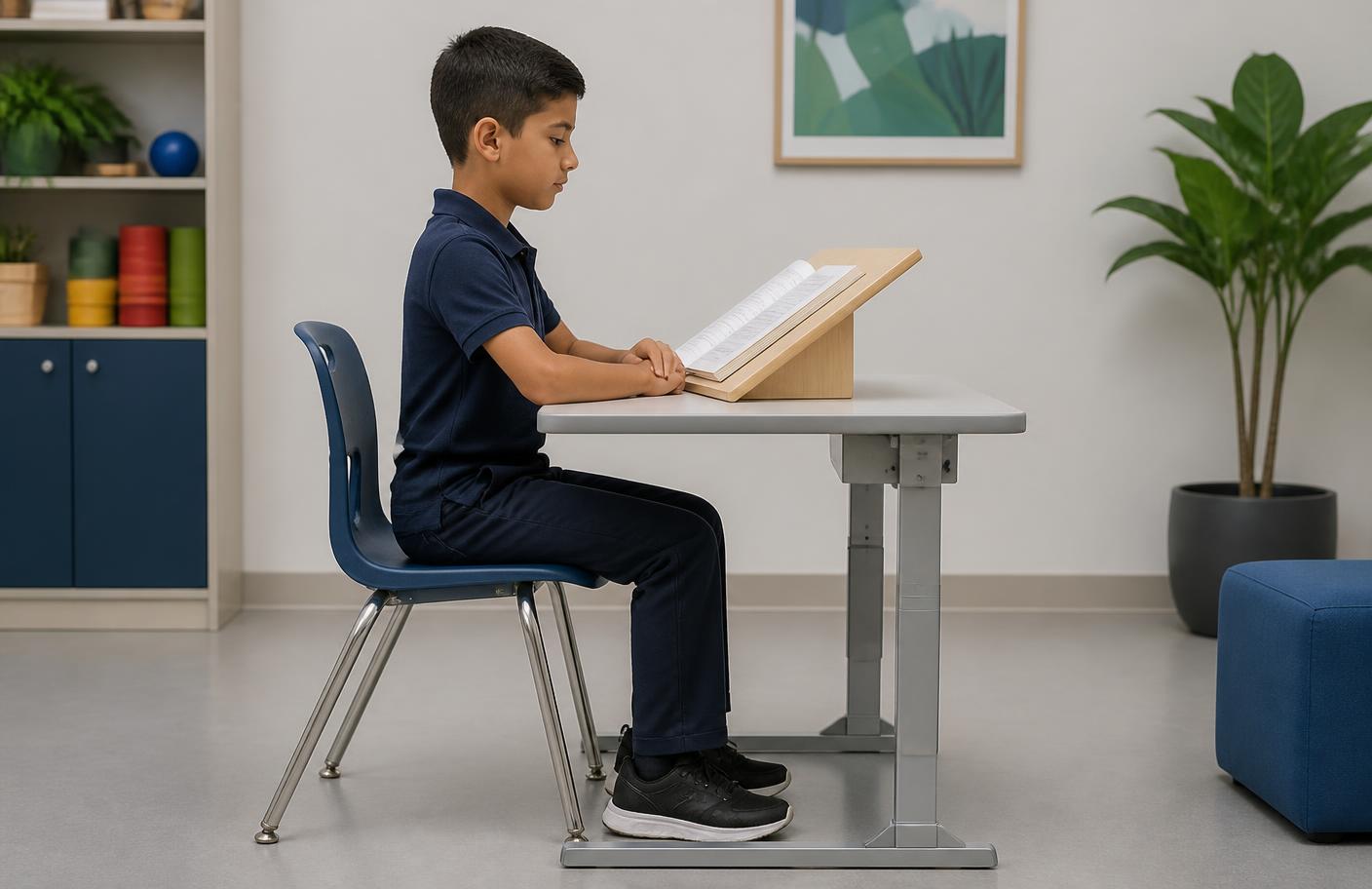
School-age student seated in neutral posture at a desk, feet flat, elbows at desk height, book on a slant board at about 40 cm

Reference posture

Feet flat, hips and knees near 90°, elbows at desk height, trunk upright and off the table.

≈40 cm at midline

A slant board holds the page at a consistent distance and angle; note any habitual 15–20 cm posture.

What to document

Head tilt, page rotation >30°, one eye closing, or distance shortening as the task lengthens.

Habitual working distance is free data. A head held at 15 cm, a persistent tilt, or a page turned 30°+ off midline all tell you something before a single probe is administered.
Why Visual Performance Matters: Foundations for Occupational Therapy Practice
12 / 21
  • Teach organization strategies (one master notebook, home/school large-print duplicates, time management).
  • Refer to Orientation & Mobility (O&M) specialists when mobility or navigation is affected; allow extra transition time.
  • Augment with tactile cues (markings on notebooks, tactile technology cues) and auditory input (screen readers, voice-to-text).
  • Multisensory pairing — visual instruction plus verbal or tactile cues — supports both low-vision and visual-processing needs simultaneously.

Say this

Frame the slide: "Organization, mobility, and multisensory support."

Walk each point, one sentence each:

• Teach organization strategies (one master notebook, home/school large-print duplicates, time management).

My notes

5.13 — Building one modification plan for two needs

Case

Application

Building one modification plan for two needs

A student has documented low vision (usable, functional vision with correction) and a separate visual-processing profile with figure-ground weakness. The IEP team asks for one classroom modification plan.

  • Q1.Which three modifications from this module serve both profiles at once?
  • Q2.What would you measure before and after the modifications to show they worked?

Circle the word that names the picture.

~90% contrast — Black on white — target for worksheets and labels.

Circle the word that names the picture.

~70% contrast — Typical newspaper / textbook print.

Circle the word that names the picture.

~40% contrast — Faded photocopy — many classroom handouts land here.

Circle the word that names the picture.

~10% contrast — Low-contrast worksheet; effectively inaccessible.

Circle the word that names the picture.

Reverse contrast — white on dark; often preferred with glare or photophobia.

Circle the word that names the picture.

Tinted background — trial it; keep it only if performance measurably improves.

The same sentence at descending contrast. Access fails long before the text disappears for a typically sighted adult — check the handout, not just the eye. Reverse contrast (light on dark) helps many students with glare sensitivity or media opacities.
Why Visual Performance Matters: Foundations for Occupational Therapy Practice
13 / 21
  • A student has documented low vision (usable, functional vision with correction) and a separate visual-processing profile with figure-ground weakness. The IEP team asks for one classroom modification plan.
  • Q1. Which three modifications from this module serve both profiles at once?
  • Q2. What would you measure before and after the modifications to show they worked?

Say this

Read the scenario aloud, slowly:

A student has documented low vision (usable, functional vision with correction) and a separate visual-processing profile with figure-ground weakness. The IEP team asks for one classroom modification plan.

Then put these questions to the room:

My notes

5.14 — Paper choice is a visual support

Before / after

Modification in hand

Paper choice is a visual support

Two-line paper — a visual support

Two lines define one body space, so the writing target is on the page instead of in the head.

Two lines define one body space, so the writing target is on the page instead of in the head.

  • • Two-line paper supplies a clear body space to aim for.
  • • Plain paper and three-line paper give more lines to sort out than the student can use.

Highlighted two-line paper — added contrast

A high-contrast band fills the body space; the baseline becomes a boundary, not a guess.

A high-contrast band fills the body space; the baseline becomes a boundary, not a guess.

  • • Contrast does the spatial work the visual system is struggling with.
  • • Same task demand, lower visual search cost.

Two-line paper is already a visual support; highlighting the body space adds contrast for students with documented access needs. Plain or three-line paper is the confusing option. Both of these are Level 1 access modifications you can put on the desk today.

Why Visual Performance Matters: Foundations for Occupational Therapy Practice
14 / 21
  • Two-line paper — a visual support: Two lines define one body space, so the writing target is on the page instead of in the head. · Two-line paper supplies a clear body space to aim for. · Plain paper and three-line paper give more lines to sort out than the student can use.
  • Highlighted two-line paper — added contrast: A high-contrast band fills the body space; the baseline becomes a boundary, not a guess. · Contrast does the spatial work the visual system is struggling with. · Same task demand, lower visual search cost.
  • Takeaway: Two-line paper is already a visual support; highlighting the body space adds contrast for students with documented access needs. Plain or three-line paper is the confusing option. Both of these are Level 1 access modifications you can put on the desk today.

Say this

Set up the contrast: "Paper choice is a visual support."

Point at the before panel first. Two lines define one body space, so the writing target is on the page instead of in the head.

Then the after panel. A high-contrast band fills the body space; the baseline becomes a boundary, not a guess.

My notes

5.15 — Module 5 video — the low-vision service model in practice

Video

Lecture

Module 5 video — the low-vision service model in practice

Why Visual Performance Matters: Foundations for Occupational Therapy Practice
15 / 21
  • Walkthrough of usable/non-usable vision, lighting, contrast, and AT selection.

Say this

Set up the clip in one sentence, play it, then debrief with "what did you notice?"

My notes

5.16 — Where low vision sits in the framework

Visual

Framework placement

Where low vision sits in the framework

Module 1 — Vision as a gateway system

12345

Frames the whole system; every level is introduced.

Module 2 — Visual pathways (ventral / dorsal)

12345

Magnocellular/dorsal work shows at Level 2 efficiency; parvocellular/ventral identification is Level 3 processing.

Module 3 — Underlying Conditions vs. Functional Limitations

12345

Ocular and neurological conditions act on the sensory foundation and on binocular efficiency; OT treats the functional limitation, not the diagnosis.

Module 4 — Comorbidity patterns

12345

Autism, ADHD, dyslexia, dysgraphia signatures appear as processing and visual-motor integration performance.

Module 5 — Low-vision service model

12345

Low vision is a Level 1 sensory-foundation problem. Contrast, lighting, and magnification restore access at the floor; the Level 5 change is the downstream result, not the target.

Module 6 — Where this goes next

12345

Functional integration is where all findings resolve into a plan of care.

L1 · Acuity & sensory foundationL2 · Visual efficiencyL3 · Visual processingL4 · Visual-motor integrationL5 · Functional integration
Which level of the framework each module is actually operating on. Use this to keep the module content, the slide framework references, and your documentation language aligned.

Low vision is a Level 1 access problem. Contrast, lighting, and magnification restore the floor so the higher levels can be measured at all.

Why Visual Performance Matters: Foundations for Occupational Therapy Practice
16 / 21
  • Low vision is a Level 1 access problem. Contrast, lighting, and magnification restore the floor so the higher levels can be measured at all.
  • Diagram: module-level-map

Say this

Talk over the visual: "Where low vision sits in the framework."

Say the caption in your own words: Low vision is a Level 1 access problem. Contrast, lighting, and magnification restore the floor so the higher levels can be measured at all.

My notes

5.17 — So what? Modifications are diagnostic, not just supportive

So what?

So what?

So what? Modifications are diagnostic, not just supportive

When you change the environment and output improves the same day, you have learned something about the student, not just helped them.

A demand mismatch responds immediately to a change in demand; a capacity limit does not.

What you do with it

  • Change one variable — clutter, layout, distance, or lighting — and record the result.
  • Give the teacher one modification, not five, so the result is interpretable.
  • Write the response to modification into your reasoning as evidence.

Watch for

No change after a clean modification trial — escalate to structured assessment.

Why Visual Performance Matters: Foundations for Occupational Therapy Practice
17 / 21
  • When you change the environment and output improves the same day, you have learned something about the student, not just helped them.
  • Because: A demand mismatch responds immediately to a change in demand; a capacity limit does not.
  • Move: Change one variable — clutter, layout, distance, or lighting — and record the result.
  • Move: Give the teacher one modification, not five, so the result is interpretable.
  • Move: Write the response to modification into your reasoning as evidence.
  • Watch for: No change after a clean modification trial — escalate to structured assessment.

Say this

Land the "so what": When you change the environment and output improves the same day, you have learned something about the student, not just helped them.

Explain the mechanism plainly: A demand mismatch responds immediately to a change in demand; a capacity limit does not.

Then give them the moves — say each one as something they can do Monday:

My notes

5.18 — Visual clutter: the same student, two desks

Before / after

Change the demand

Visual clutter: the same student, two desks

Before — competing detail

Overlapping papers, patterned surface, busy wall directly behind the work.

Overlapping papers, patterned surface, busy wall directly behind the work.

  • • Figure-ground load is highest exactly where the task is
  • • Locating the next item costs a search, not a saccade

After — one task in view

One page, one tool, plain background, work placed in midline.

One page, one tool, plain background, work placed in midline.

  • • Search cost drops, so effort goes to the task
  • • Attention loss now means something else — keep looking

Change one variable at a time. If output improves with clutter removed, you have found a demand problem, not a capacity problem.

Why Visual Performance Matters: Foundations for Occupational Therapy Practice
18 / 21
  • Before — competing detail: Overlapping papers, patterned surface, busy wall directly behind the work. · Figure-ground load is highest exactly where the task is · Locating the next item costs a search, not a saccade
  • After — one task in view: One page, one tool, plain background, work placed in midline. · Search cost drops, so effort goes to the task · Attention loss now means something else — keep looking
  • Takeaway: Change one variable at a time. If output improves with clutter removed, you have found a demand problem, not a capacity problem.

Say this

Set up the contrast: "Visual clutter: the same student, two desks."

Point at the before panel first. Overlapping papers, patterned surface, busy wall directly behind the work.

Then the after panel. One page, one tool, plain background, work placed in midline.

My notes

5.19 — Two-minute case: one variable at a time

Mini case

Two-minute case

Two-minute case: one variable at a time

You want to help a student who cannot copy from the board. The teacher offers to move his seat, enlarge the print, give him a printed copy, and add a slant board all at once.

What do you ask her to do instead, and why?

Why Visual Performance Matters: Foundations for Occupational Therapy Practice
19 / 21
  • You want to help a student who cannot copy from the board. The teacher offers to move his seat, enlarge the print, give him a printed copy, and add a slant board all at once.
  • Question: What do you ask her to do instead, and why?
  • Model answer: Start with the printed near copy alone for a week and record completion, because it removes the far-to-near transition entirely. If output normalizes, the far-near shift is the demand; if it does not, add the next single change. Bundling four modifications gives you a happier student and no information.
  • Teaching point: Stack modifications for support, but trial them one at a time when you need an answer.

Say this

Two-minute case. Read it aloud:

You want to help a student who cannot copy from the board. The teacher offers to move his seat, enlarge the print, give him a printed copy, and add a slant board all at once.

Put the question to them: "What do you ask her to do instead, and why?" Give 60 seconds, no talking.

My notes

5.20 — Reflect and share

Reflection

Reflect and share

Reflect and share

Choose one occupation from your caseload or life. Describe one modification at each of the four low-vision levels for that occupation.

THINKPROCESSSHARE
Why Visual Performance Matters: Foundations for Occupational Therapy Practice
20 / 21
  • Choose one occupation from your caseload or life. Describe one modification at each of the four low-vision levels for that occupation.
  • Starter: For [occupation]: increasing visibility means... enhancing the signal means... substitution means...

Say this

Reflection prompt: "Choose one occupation from your caseload or life. Describe one modification at each of the four low-vision levels for that occupation."

Offer the sentence starter: "For [occupation]: increasing visibility means... enhancing the signal means... substitution means..."

Think for one minute, write, then take two shares.

My notes

5.21 — Knowledge check — low-vision model

Self-check

Knowledge check

Knowledge check — low-vision model

Which strategy is an example of "enhancing" the visual signal?

Why Visual Performance Matters: Foundations for Occupational Therapy Practice
21 / 21
  • Which strategy is an example of "enhancing" the visual signal?
  • – Adding a desk lamp
  • ✓ Using a handheld magnifier
  • – Listening to an audiobook instead of reading
  • – Adding high-contrast tape to stairs
  • Rationale: Enhancing the signal means magnifying the target or bringing it closer. Adding light is increasing visibility; audiobooks are substitution; high-contrast tape is increasing visibility.

Say this

Knowledge check: "Which strategy is an example of "enhancing" the visual signal?"

Options:

• Adding a desk lamp

My notes